Posts

Posts mit dem Label "exiftool" werden angezeigt.

360° Map of the Nuremberg Area from 1581

Bild
Prologue : I originally planned to publish this blog post during the LGM 2026 in Nürnberg. Sadly, however, the  image  from the museum's object catalogue is under CC BY-NC-ND 4.0, so I was not allowed to use it to create a VR panorama. Fortunately, however, the museum has given me permission today to use it under a CC0 1.0 license. At the Germanische Nationalmuseum , I discovered this 360° map of the Nuremberg area from 1581. I just had to convert this 360° round image into a panorama for VR glasses, especially as it is the oldest one I have ever seen – it is almost 500 years old! https://objektkatalog.gnm.de/objekt/La140   First, I removed the decorations in the corners and cleaned up the image. Then, using the workflow described in this old  tutorial , I created an equirectangular 360° panorama. Finally, I added metadata with ExifTool to enable Google Photos and other panorama viewers to detect it as a 360° panorama.    The embedded A-Frame I used s...
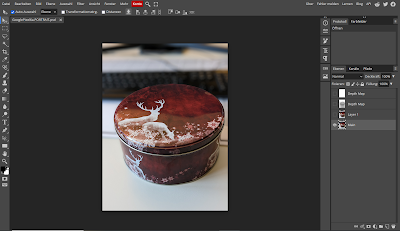
7 methods to get a depth map without exiftool

Bild
Online Tools Use an online extractor e.g.: Depth Map Extractor or Depth Extractor (both don't work with my example file from the Google Pixel 6a) Use Photopea. Photopea is even able to import all other images inside the metadata. You can use this tutorial or directly go to https://www.photopea.com/ .   Command line Tools Depth-map-extractor an Python script optimised for photos from Huawei  phones. Phonedepth , a small command line tool to extract depth data. Creating not extracting In 3D tools like blender you can simply render the mist pass/depth map and then use it in other programs: AI: There are several AI depth map creation tools. (online and local). The quality varies quite a lot depending on the input image and the used model. Sometimes it looks good at first glance, but is simply wrong. However, the AI models are improving very quickly. But if it is not perfect you can fix it, have a look at the last point. Here for example the not very good output result from 3...

How to extract mp4 videos from your Google Pixel 6a photos

Bild
The Google Pixel 6a phone can take so-called motion pictures. These are jpeg images with a short mp4 video included in the metadata. This is how you see the image in an normal image viewer. This command allows you to extract the video from the jpeg file: exiftool -b -p "${trailer;s/.*(\0\0\0\x1cftypisom)/$1/s}" -ext jpg -w mp4 DIRECTORY or FILENAME -b Output metadata in binary format.  -p "${trailer;s/.*(\0\0\0\x1cftypisom)/$1/s}" Some magic to remove an offset in the binary file. https://exiftool.org/exiftool_pod.html#Advanced-formatting-feature -ext jpg Process files with the specified extension -w mp4 New filename extension DIR Directory or filename    This is the extracted video:  

Depth Map from Google Pixel 6a Photos

Bild
An other phone an other method to get the depth map. 😕 If you shoot with an Google Pixel in the "Portrait" mode it saves three images in one jpeg. The First one ist the Main image you See in every image viewer, second one is the image without any filter applied and the third one is the depth map. Main Image You can get the images with the command line tool " exiftool ". This time the depth map is not saved as embedded data but as a trailer. To extract it you need to fist run: "exiftool(-k).exe" MainImage.PORTRAIT.jpg -trailer -b > ImageWithoutFilter.jpg Image without filter This extracts an image with without any filter applied. Now you need to run the same command with the new created image, this will extract now the depth map: "exiftool(-k).exe" ImageWithoutFilter.jpg  -trailer -b > DepthMap.jpg Depth Map    

Depth Map from Samsung Gallaxy M33 Photos

Bild
If you shoot with an Samsung Galaxy M33 in the "Portrait" mode Samsung saves three images inside one jpeg. The first one is the one you see if you open the photo with any application. The second one is the image without any filter applied and the third one is the shot from the depth map camera. Main Image You can get the images from all cameras with the command line tool " exiftool ". First you can check with this commands, if the image contains any additional images:   "exiftool(-k).exe" 20220921_091253.jpg "-embedded*" -a Embedded Image Name : DualShot_1 Embedded Image      : (Binary data 2449408 bytes, use -b option to extract) Embedded Image Name : DualShot_2 Embedded Image 2    : (Binary data 576210 bytes, use -b option to extract) -- press ENTER -- And with this command you can check for a depth map : "exiftool(-k).exe" 20220921_091253.jpg -"*depth*" Depth Map Name      : DualShot_DepthMap_1 Depth Map Data...

Panorama of old vase in VR - "View of Berlin from the roof of the dome"

Bild
Panorama „View of Berlin from the roof of the dome“ from a crater shape vase. Bild: Klassik Stiftung Weimar After I created the first 360° view from a vase , the Klassik Stiftung Weimar provided an second panorama from an old vase (1835 - 1841) created by Royal Porcelain Factory in Berlin (KPM) . This time it's a view of Berlin from the roof of the dome . Panorama „View of Berlin from the roof of the dome“ from a crater shape vase. Bild: Klassik Stiftung Weimar This time I did not remove the handles at the bottom and the result looks really nice in the VR glasses. I've done nearly the same then with the last vase panorama. Most of the work wass done with GIMP, I created the missing sky with gmics inpainting method and then added some meta data with exiftool. Panorama „View of Berlin from the roof of the dome“ from a crater shape vase. Bild: Klassik Stiftung Weimar edited by me Thanks to A-Frame I can now embed it as VR view here: The lin...

VR Image Collection

Bild
Here I collect all my VR images I created to show an overview. Die headlines are links to the longer blog articles. I use Goggle Photos media viewer in the Daydream app . An nice alternative Android app to view panoramas is the VR Media Player - 360° Viewer. CC BY Maurizio Pesce Old Images 1786 "A Circular View from the Balloon at its greatest Elevation", featured in Thomas Baldwin’s Airopaidia   https://photos.app.goo.gl/zYjsLDvNJF4cGNzd8 1779-1796 from Marc-Théodore Bourrit  https://photos.app.goo.gl/Yx1vFtsRhf8zKc9U9 1823 Adolph Kaiser: Panorama Inselsberg in VR Adolph Kaiser: Panorama Inselsberg. Bild: Klassik Stiftung Weimar Adolph Kaiser: Panorama Inselsberg. Bild: Klassik Stiftung Weimar edited by me https://photos.app.goo.gl/qNdzLtRdgzNUkaqa9   1824 Dresden from Carl August Richter  https://photos.app.goo.gl/hCnfMHmFACP2Q9Jy7 https://photos.app.goo.gl/jGhWqyXwtNXPZeNo9 1841 Königlichen Porzell...

The Earth in VR Inside out.

Bild
This experiment was about projecting the earth inside a hollow sphere and then viewing it with my Daydream. I simply added the metadata with exiftool . You can view it with you browser too. But that is only half the fun. https://photos.google.com/photo/AF1QipM_BCvyzoa8Y8F00Q66dpXqwwx7f6GDrmBiSBUv

Depth Map from Gallaxy S10 Photos

Bild
If you shoot with an Samsung Galaxy S10 Plus photos in the "Live Focus" mode Samsung saves four images. The first one is the one you see if you open the photo with any application. The second one is the image without any filter applied and the third one is the shot from the wight angle lens. You can get the images from all cameras with the command line tool "exiftool" and this command: exiftool -embeddedImage -a -b -W %d%f%c.%s test.jpg Image 1, with blurred background "effect" applied Image 2, without any filters added Image 3, a photo from the wight angle lens The fourth image is a depth map. The depth map is a raw 8-bit 1008 x 476 array and you can extract it with this command: exiftool -EmbeddedImage -b test.jpg > output.data To open the image you can use the Raw data loader from Gimp. Use File -> Open... and then select the image. Now you need to change the image type to "Gray 8 bit", the wight to "1008...

Inside the Dresdener Frauenkirche VR

Bild
 I used my last tutorial but this time I took an recent photo from inside the Dresden Frauenkirche I found here: https://www.flickr.com/photos/w-b-r/37537092641 (Werner Reutemann CC BY-NC-SA) The image converted to an 360x180° panorama: And now you are able so stand inside the dome of the Dresden Frauenkirche : https://photos.app.goo.gl/AkzLWgz4UH1ZNzzk7

Update: Dresden 1824 - A 195 Year old image as 3D Wireframe in VR

Bild
  In the last post I converted an 195 year old image from Carl August Richter into an version that can be viewed with an VR headset. Now I found an older version of this image. I cleaned it up and changed the colours and than made the same then in the last tutorial. And now we are able to view this more then 195 year old image in 3D wireframe style with a VR headset. https://photos.app.goo.gl/jGhWqyXwtNXPZeNo9