Posts

Posts mit dem Label "depthmap" werden angezeigt.

QGIS 3D MAP mit offenen Daten

Bild
Wie man hier im Blog sehen kann, beschäftige ich mich schon seit einiger Zeit mit der Erstellung von Karten für Fotobücher. Bisher habe ich dafür GIMP und Inkscape verwendet. Nun wurde ich zum ersten Mal "gezwungen" mich mit QGIS zu beschäftigen. Auslöser war ein Blogpost von https://opendata.stadt-muenster.de/ über 3D-Gebäudedaten , die für ganz NRW kostenlos zur verfügung stehen. Also habe ich den Urlaub zwischen den Feiertagen genutzt mir verschiede Tutorials über QGIS anzuschauen, damit ich überhaubt was mit den Daten anfangen konnte. Als Testgebiet habe ich die Schleife in Münster Kinderhaus gewählt, da es dort viele Häuser in unterschiedlichen Höhen gibt. Leider war die Qualität der 3D-Gebäudemodelle "LoD1" und "LoD2" schlechter als erhofft. Einige Gebäude fehlten ganz, andere waren nur als Punkte dargestellt, wie man auf diesem Screenshot sehen kann: Was in der 3D-Ansicht natürlich nicht allzu beeindruckend aussah: Zum Glück habe ich dann noch e...
Monocular Depth Estimation using Diffusion Models

Here a little bit more about AI depth map generation. Google published an interesting paper: Monocular Depth Estimation using Diffusion Models   https://arxiv.org/abs/2302.14816   https://depth-gen.github.io/   ZoeDepth: Combining relative and metric depth (Official implementation) https://huggingface.co/spaces/RamAnanth1/ZoeDepth https://github.com/isl-org/ZoeDepth  

7 methods to get a depth map without exiftool

Bild
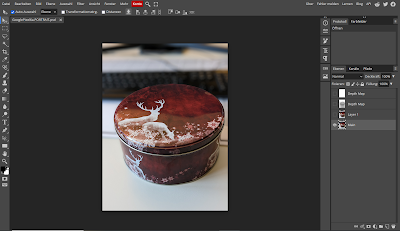
Online Tools Use an online extractor e.g.: Depth Map Extractor or Depth Extractor (both don't work with my example file from the Google Pixel 6a) Use Photopea. Photopea is even able to import all other images inside the metadata. You can use this tutorial or directly go to https://www.photopea.com/ .   Command line Tools Depth-map-extractor an Python script optimised for photos from Huawei  phones. Phonedepth , a small command line tool to extract depth data. Creating not extracting In 3D tools like blender you can simply render the mist pass/depth map and then use it in other programs: AI: There are several AI depth map creation tools. (online and local). The quality varies quite a lot depending on the input image and the used model. Sometimes it looks good at first glance, but is simply wrong. However, the AI models are improving very quickly. But if it is not perfect you can fix it, have a look at the last point. Here for example the not very good output result from 3...

Depth Map from Google Pixel 6a Photos

Bild
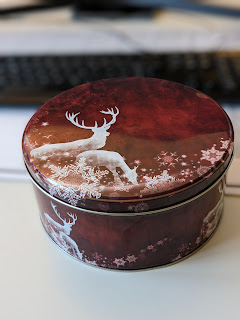
An other phone an other method to get the depth map. 😕 If you shoot with an Google Pixel in the "Portrait" mode it saves three images in one jpeg. The First one ist the Main image you See in every image viewer, second one is the image without any filter applied and the third one is the depth map. Main Image You can get the images with the command line tool " exiftool ". This time the depth map is not saved as embedded data but as a trailer. To extract it you need to fist run: "exiftool(-k).exe" MainImage.PORTRAIT.jpg -trailer -b > ImageWithoutFilter.jpg Image without filter This extracts an image with without any filter applied. Now you need to run the same command with the new created image, this will extract now the depth map: "exiftool(-k).exe" ImageWithoutFilter.jpg  -trailer -b > DepthMap.jpg Depth Map    

Depth Map from Samsung Gallaxy M33 Photos

Bild
If you shoot with an Samsung Galaxy M33 in the "Portrait" mode Samsung saves three images inside one jpeg. The first one is the one you see if you open the photo with any application. The second one is the image without any filter applied and the third one is the shot from the depth map camera. Main Image You can get the images from all cameras with the command line tool " exiftool ". First you can check with this commands, if the image contains any additional images:   "exiftool(-k).exe" 20220921_091253.jpg "-embedded*" -a Embedded Image Name : DualShot_1 Embedded Image      : (Binary data 2449408 bytes, use -b option to extract) Embedded Image Name : DualShot_2 Embedded Image 2    : (Binary data 576210 bytes, use -b option to extract) -- press ENTER -- And with this command you can check for a depth map : "exiftool(-k).exe" 20220921_091253.jpg -"*depth*" Depth Map Name      : DualShot_DepthMap_1 Depth Map Data...

Dephth Maps - Startups - Update 1

Bild
Today I'd like to present three European startups. They all try to create depth maps with different technologies. Blickfeld with LiDAR https://www.blickfeld.com/products/ Blickfeld is developing a solid state LiDAR. This is not made for adding depth maps to photos, but I can imagine an LiDAR mounted on a camera like a flash. Update 1: Apples new iPhone has an integrated LiDAR sensor. Point cloud created with a LiDAR: Image captured with the iPhone 12 LiDAR scanner. Image used courtesy of Apple   K|Lens with a kaleidoscope inside a lens https://www.k-lens.de/en/home K|Lens is developing an objective that can be used by every full format camera. The nice thing with this solution is, that you only need one shot. The bad thing is, that your resolution will be reduced. In the worst case your image will have 1/9 of you sensor size. K|Lens is working on a solution to get 2/3 of the original resolution. Depth map from a K|Lens shot: Wooptix with a very fast liquid lens https://woop...

Depth Map from Gallaxy S10 Photos

Bild
If you shoot with an Samsung Galaxy S10 Plus photos in the "Live Focus" mode Samsung saves four images. The first one is the one you see if you open the photo with any application. The second one is the image without any filter applied and the third one is the shot from the wight angle lens. You can get the images from all cameras with the command line tool "exiftool" and this command: exiftool -embeddedImage -a -b -W %d%f%c.%s test.jpg Image 1, with blurred background "effect" applied Image 2, without any filters added Image 3, a photo from the wight angle lens The fourth image is a depth map. The depth map is a raw 8-bit 1008 x 476 array and you can extract it with this command: exiftool -EmbeddedImage -b test.jpg > output.data To open the image you can use the Raw data loader from Gimp. Use File -> Open... and then select the image. Now you need to change the image type to "Gray 8 bit", the wight to "1008...

Playing with the K-Lens demo images

Bild
K|Lens provides this first images from the prototype objective: And the generated depth map: As first I made a small animation with http://depthy.me (The link no longer works.): And then I had some fun with GIMP/g'mic: 1. Focus to the background. 2. Focus to the foreground: For the two images above I simply used the depth map as mask. here is how it looks in GIMP:

Googles new Camera App - Update

Bild
Googles new Camera App saves a depth map inside the EXIF data. You can extract it with: $ exiftool -Data -b v2lsFX.jpg | base64 -d > test.png Here is an example: More links, that may be interesting in this context: Google Documentation: https://developers.google.com/depthmap-metadata/reference Depth-of-field-based alpha-matte extraction: http://citeseerx.ist.psu.edu/viewdoc/summary?doi=10.1.1.83.5098 Gimp Focus Blur Plugin: http://registry.gimp.org/node/1444 Update: Google removed this App for most phones from the AppStore. But you can get it from alternative resources like apkmirror.com. You need at least Version 2.7: https://www.apkmirror.com/apk/google-inc/camera/camera-2-7-008-release/ A nice online tool to play with the images is depthy, a third dimension viewer: http://depthy.me (The link no longer works.)